
Streaming
Render an LLM reply with formulas while it is still arriving — unfinished formulas render as far as they go instead of flashing as raw TeX.
The clip is MathText(text, streaming: true) rebuilt with six more
characters every frame, rendered by the screenshot generator.
Text that is still arriving
Section titled “Text that is still arriving”Set MathText.streaming while the reply is generating:
- A formula that is still open renders as far as it goes.
- A dangling opening delimiter (
$,$$,\[) is held back rather than shown. - An open
$followed by a digit stays text — a price — until what follows is clearly math: a command,^,_,=or a brace. - With
markdownon, a code span or HTML comment that is not yet closed hides the rest of the text as code until it closes.
Set it back to false when the reply is complete, so a formula that really
is unfinished shows its error.
import 'dart:async';
import 'package:flutter/material.dart';import 'package:val_latex_flutter/val_latex_flutter.dart';
class StreamingReply extends StatefulWidget {  const StreamingReply({super.key, required this.chunks});
  /// The reply, arriving in pieces.  final Stream<String> chunks;
  @override  State<StreamingReply> createState() => _StreamingReplyState();}
class _StreamingReplyState extends State<StreamingReply> {  final _text = StringBuffer();  var _done = false;  StreamSubscription<String>? _subscription;
  @override  void initState() {    super.initState();    _subscription = widget.chunks.listen(      (chunk) => setState(() => _text.write(chunk)),      onDone: () => setState(() => _done = true),    );  }
  @override  void dispose() {    _subscription?.cancel();    super.dispose();  }
  @override  Widget build(BuildContext context) {    return MathText(_text.toString(), streaming: !_done);  }}
MathText parses every formula with its own streaming value, replacing the
one in its parseOptions, so you set it in one place.
How unfinished parts look
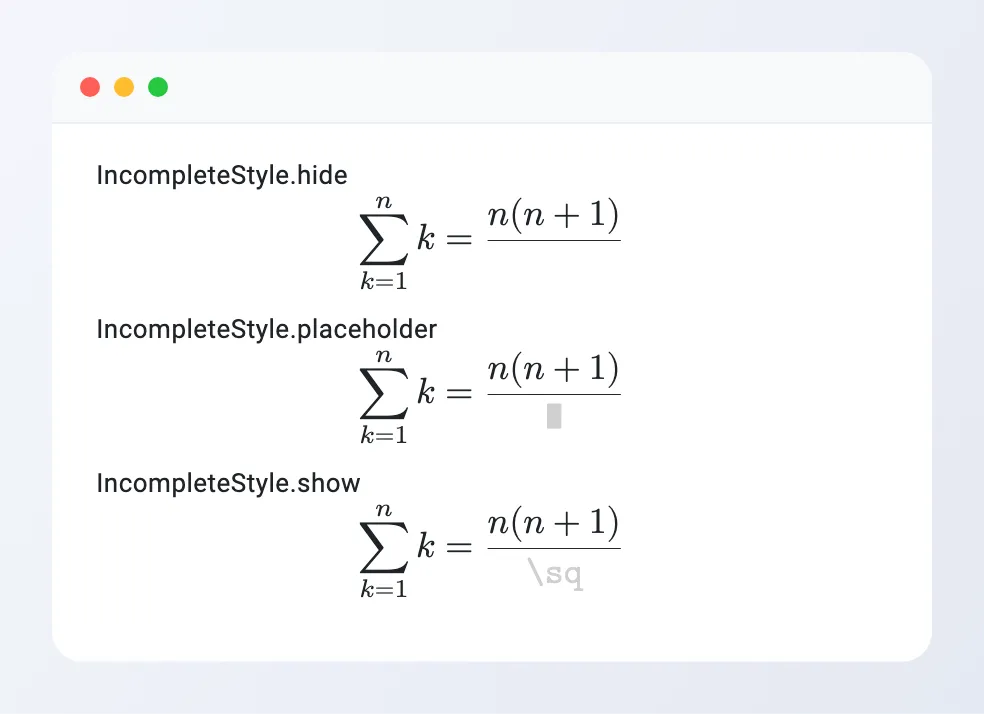
Section titled “How unfinished parts look”LayoutOptions.incomplete chooses what the missing part of a formula looks
like: nothing (hide, the default), a small grey box (placeholder), or the
half-typed text (show).
import 'package:flutter/widgets.dart';import 'package:val_latex_flutter/val_latex_flutter.dart';
/// A formula cut off in the middle of a command, as it is while a reply/// streams in, drawn with each `IncompleteStyle`.Widget example() => Column(  crossAxisAlignment: CrossAxisAlignment.start,  children: [    for (final style in IncompleteStyle.values) ...[      Text('$style', style: const TextStyle(fontSize: 13)),      Math.tex(        r'\sum_{k=1}^{n} k = \frac{n(n+1)}{\sq',        displayMode: true,        parseOptions: const ParseOptions(streaming: true),        layoutOptions: LayoutOptions(incomplete: style),      ),      const SizedBox(height: 8),    ],  ],);
One formula at a time
Section titled “One formula at a time”Math.tex and MathSpan take their formula as complete by default
(ParseOptions(streaming: false)), so x + \frac{a}{ shows its error. For a
single formula that is still arriving, pass
parseOptions: ParseOptions(streaming: true), as in the example above.
The engine’s parseLatex is the other way round: its default
ParseOptions() streams. Unfinished input at the end of the source — an
open group, environment or \left, a missing argument, a half-typed command
— sets ParseResult.incomplete instead of adding errors. Pass
ParseOptions(streaming: false) when the source is complete.
Node ids (ParseResult.idOf) are built from each node’s kind and position,
so a node keeps its id as more input is appended after it.
Finding formulas in a stream yourself
Section titled “Finding formulas in a stream yourself”MathScanner(streaming: true) returns a formula still open at the end of the
text as a MathSegment with complete: false. See
Finding math in text.