
MathText
Text with $…$ and $$…$$ formulas in it — a chat reply or Markdown paragraph — with inline formulas that wrap with the words, and support for text still streaming in.
import 'package:flutter/widgets.dart';import 'package:val_latex_flutter/val_latex_flutter.dart';
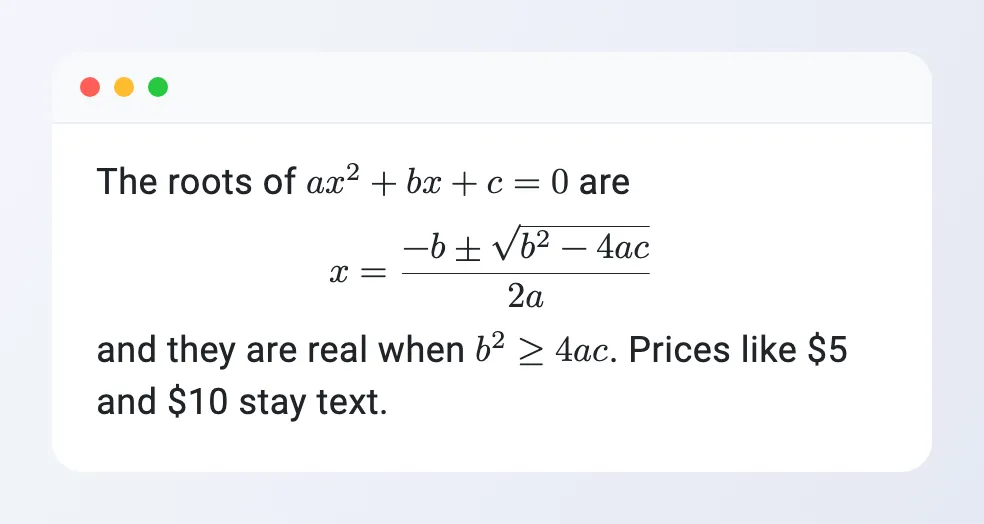
/// Text with formulas in it, as a chat reply writes it.Widget example() => const MathText(  r'The roots of $ax^2 + bx + c = 0$ are'  r'$$x = \frac{-b \pm \sqrt{b^2-4ac}}{2a}$$'  r'and they are real when \(b^2 \ge 4ac\). '  r'Prices like $5 and $10 stay text.',);
MathText renders a string with formulas in it. Inline formulas sit on the
text baseline and wrap with the words; display formulas become their own
centred blocks. Formulas take their size and colour from style, merged over
the ambient DefaultTextStyle.
Delimiters
Section titled “Delimiters”| Delimiter | Kind |
|---|---|
$…$, \(…\) |
inline |
$$…$$, \[…\] |
display |
\\(…\\), \\[…\\] |
inline and display, for text whose backslashes were escaped twice (JSON) |
Bare math environments count as display math without delimiters:
\begin{align}…\end{align}, equation, cases, the matrix environments,
tabular and the list environments, among others (mathEnvironments lists
them). Pass delimiters to use your own list of MathDelimiters.
Dollar signs and prices
Section titled “Dollar signs and prices”A single $ follows Pandoc’s rule, so prices stay text:
- the opening
$must be followed by a non-space; - the closing
$must be preceded by a non-space and not followed by a digit; \$is a literal dollar sign.
So It costs $5 and $10 is text, while $x$ is a formula. With
spacedDollars: true, $ x + y $ is a formula too; prose with prices then
needs \$.
Markdown code is left alone
Section titled “Markdown code is left alone”markdown is on by default: $ inside code spans, fenced or indented code
blocks and HTML comments is not math, and block-quote markers (>) are
removed from the lines of display math opened inside a quote. MathText does
not render Markdown formatting — headings, bold, lists stay as typed; it reads
the Markdown structure only to find code. For plain text that uses backticks,
~~~, <!--, or lines indented by four spaces after a blank line, pass
markdown: false.
Streaming
Section titled “Streaming”Set streaming: true while the text is still arriving: a formula that is
still open renders as far as it goes, and a dangling $ is held back rather
than shown. Set it to false when the reply is complete, so a formula that
really is unfinished shows its error. See Streaming.
Line breaking
Section titled “Line breaking”With wrap (the default) a long inline formula breaks across lines after
binary operators and relations, as TeX breaks a paragraph. With
balanceLines (the default) the paragraph’s line breaks are chosen together,
as TeX chooses them, so there is no very short line before a long formula;
it needs a bounded width. With wrap: false each inline formula is a
MathSpan and never breaks.
displaySpacing is the space above and below each display formula (8 by
default).
Shared macros
Section titled “Shared macros”Pass one table from newMacroTable() as macros and a \newcommand in one
formula works in the later ones. See Supported LaTeX.
Finding formulas yourself
Section titled “Finding formulas yourself”MathText is built on MathScanner, part of the pure-Dart engine. Use it
directly to split text into text and formula segments in your own renderer:
see Finding math in text.
API reference
Section titled “API reference”MathText
Section titled “MathText”Text with formulas in it: The area is $\pi r^2$.
More about MathText
Inline formulas ($…$, \(…\)) sit on the text baseline; display
formulas ($$…$$, \[…\], \begin{align}…) become their own
centred blocks. Set streaming while text is still arriving (an LLM
response): an unfinished formula renders as far as it goes instead of
flashing as raw TeX.
The text is read as Markdown by default (markdown): $ inside code
spans, fenced or indented code blocks and HTML comments is not math,
as chat replies need. Plain text that indents lines by four spaces
after a blank line, or uses backticks, wants markdown: false.
| Constructor | Description |
|---|---|
MathText(text, {…}) |
Creates mixed text. |
MathText: more
const MathText( this.text, { super.key, this.style, this.textAlign, this.textDirection, this.streaming = false, this.delimiters = MathDelimiter.standard, this.markdown = true, this.spacedDollars = false, this.textFonts = MathTextFonts.latinModern, this.parseOptions = const ParseOptions(), this.macros, this.displaySpacing = 8, this.wrap = true, this.balanceLines = true,})| Field | Type | Default | Description |
|---|---|---|---|
text |
String |
required |
The text with embedded TeX. |
style |
TextStyle? |
Text style; formulas take their size and colour from it. | |
textAlign |
TextAlign? |
Alignment of text paragraphs. | |
textDirection |
TextDirection? |
Direction of text paragraphs (defaults to the ambient direction). | |
streaming |
bool |
false |
Text is still arriving: unfinished formulas render as far as they go, and so do formulas with a half-typed command at the end. When false, an unfinished formula shows its error. |
delimiters |
List<MathDelimiter> |
MathDelimiter.standard |
Math delimiters. |
markdown |
bool |
true |
Read the text as Markdown: leave code spans, code blocks and HTML comments alone, and drop block-quote markers inside display math (see MathScanner.markdown). |
spacedDollars |
bool |
false |
Accept spaces just inside $…$ ($ x + y $), as KaTeX’s auto-render does (see MathScanner.spacedDollars). Off by default, by Pandoc’s rule, so prose with prices stays text. |
textFonts |
MathTextFonts |
MathTextFonts.latinModern |
Fonts for text inside formulas. |
parseOptions |
ParseOptions |
const ParseOptions() |
Parse options for every formula. Their ParseOptions.streaming is replaced by streaming. |
macros |
MacroTable? |
Shared macros, so \newcommand in one formula works in later ones. |
|
displaySpacing |
double |
8 |
Vertical space around display formulas. |
wrap |
bool |
true |
Let long inline formulas break across text lines (after binary operators and relations, as TeX does in paragraphs). |
balanceLines |
bool |
true |
Break the lines of a paragraph where TeX would: weighing every line (the squares of their spare widths) rather than filling each as full as it goes, so a paragraph has no very short line before a long formula. Needs wrap and a bounded width. |