
Right-to-left math
Arabic mathematical notation — mirrored layout, Arabic-Indic and Persian digits, Arabic operator names — and how text inside formulas follows its own direction.
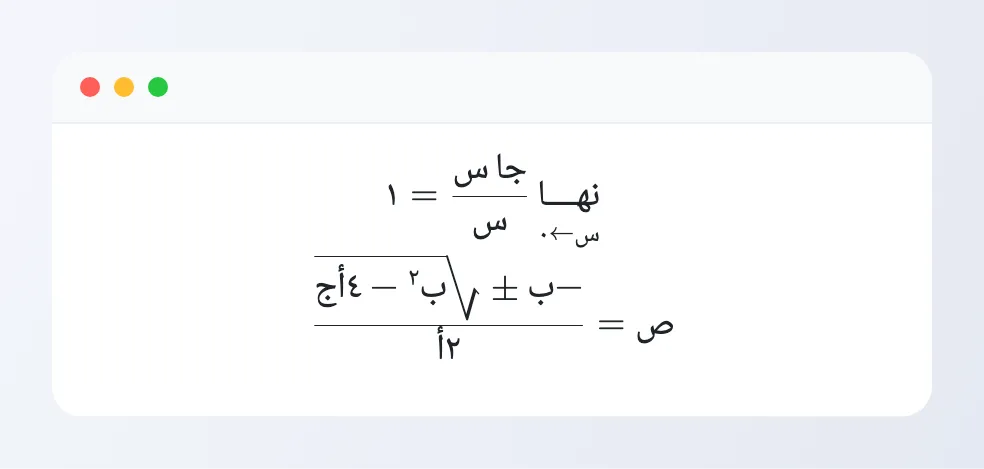
import 'package:flutter/widgets.dart';import 'package:val_latex_flutter/val_latex_flutter.dart';
/// Arabic notation: mirrored layout, Arabic-Indic digits and Arabic/// operator names. The Arabic letters are text, so the app needs a font/// that has them (here Noto Naskh Arabic, declared in its pubspec).Widget example() => const Directionality(  textDirection: TextDirection.rtl,  child: Column(    children: [      Math.tex(        r'\lim_{س \to 0} \frac{\sin س}{س} = 1',        displayMode: true,        layoutOptions: _rtl,        textFonts: _fonts,      ),      Math.tex(        r'ص = \frac{-ب \pm \sqrt{ب^2 - 4 أ ج}}{2 أ}',        displayMode: true,        layoutOptions: _rtl,        textFonts: _fonts,      ),    ],  ),);
const _rtl = LayoutOptions(  displayMode: true,  mathDirection: MathDirection.rtl,  digits: DigitStyle.arabicIndic,  operatorNames: arabicOperatorNames,);
const _fonts = MathTextFonts(fallback: ['NotoNaskhArabic']);
Mirrored math
Section titled “Mirrored math”LayoutOptions(mathDirection: MathDirection.rtl) lays a formula out right to
left, as Arabic mathematical notation does: the formula is mirrored, and
directional symbols — brackets, radicals, ∑, ∫, arrows, < — are drawn
mirrored, while numbers and text keep their own direction. Equation numbers
go on the left (on the right with leqno).
| Option | Values |
|---|---|
digits |
DigitStyle.western (default), arabicIndic (٠١٢٣), persian (۰۱۲۳) |
operatorNames |
Replacement names for named operators, keyed by command. arabicOperatorNames covers \sin, \cos, \tan, \cot, \sec, \csc, \lim and \log. |
kashida |
Stretch Arabic operator names with kashida (ـ) to span wide limits. Default true. |
Arabic letters need a font
Section titled “Arabic letters need a font”Arabic letters in a formula are text, shaped by Flutter’s text engine, so
the app needs a font that has them. After the families in
MathTextFonts.fallback the platform’s fonts are tried; to be sure of the
result, bundle a font, declare it in your pubspec.yaml and name it in
fallback, as the example does with Noto Naskh Arabic.
Text inside left-to-right math
Section titled “Text inside left-to-right math”In ordinary left-to-right math, the text runs inside a formula (\text{…})
take their base direction from LayoutOptions.textDirection. Its default,
TextRunDirection.auto, uses the surrounding Directionality in a Math
widget, and otherwise each run’s first strong character.
Spoken Arabic
Section titled “Spoken Arabic”toSpeech(result, language: SpeechLanguage.arabic) reads formulas in Modern
Standard Arabic school phrasing; Math’s speechLanguage does the same for
screen readers. Part of its vocabulary (less common symbols, and the words
for tables and lists) is still a draft, not yet checked by a native reader.