
Table
Tables with aligned columns, scrolling when they are wider than the screen.
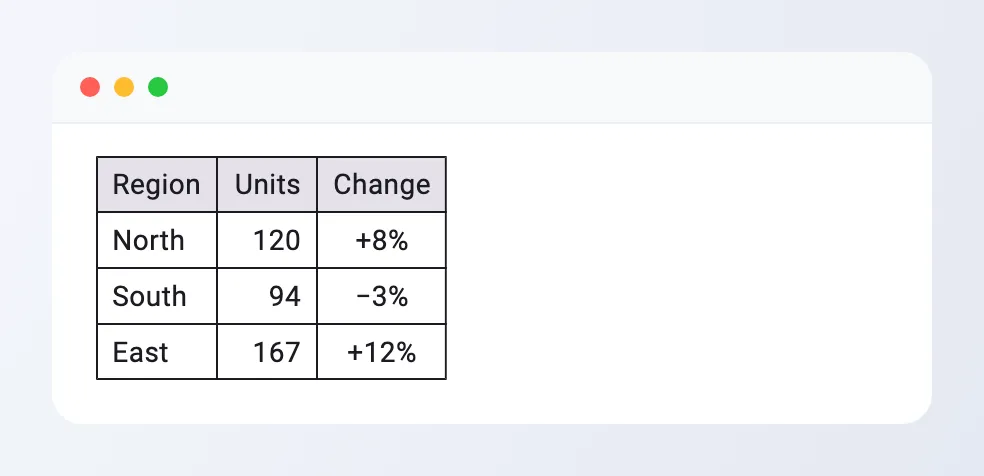
| Region | Units | Change ||:-------|------:|:------:|| North | 120 | +8% || South | 94 | −3% || East | 167 | +12% |Syntax
Section titled “Syntax”GitHub-style pipes, with the alignment row deciding each column:
:--- left, ---: right, :---: centre. Cells hold inline Markdown — bold,
code, links, maths. HTML <table>s with colspan and rowspan work too; see
HTML.
Styling
Section titled “Styling”styleSheet: const GptMarkdownStyleSheet( table: TableStyle( borderColor: Color(0x1F000000), borderWidth: 1, borderRadius: Radius.circular(8), cellPadding: EdgeInsets.symmetric(horizontal: 12, vertical: 8), headerBackground: Color(0x0A000000), headerTextStyle: TextStyle(fontWeight: FontWeight.w600), ),),columnWidth sets one width policy for every column. Left unset, a column is
sized to its content, which lays every cell out twice — once to measure, once
for real. columnWidth: FixedColumnWidth(120) skips that measurement, which is
the escape hatch for a large or streaming table.
A flex policy is not, with the default overflow. Tables scroll horizontally
when they exceed the available width, so the table is laid out against an
unbounded width and a flex column has no finite width to take a share of:
FlexColumnWidth() collapses the table to zero width and wraps every cell to
one character a line.
overflow decides what a table wider than the screen does:
TableOverflow.scroll(the default) keeps columns at their content width and scrolls the table sideways.TableOverflow.wrapfits the table to the available width and wraps the text in its cells. Columns shrink toward their longest word, so short columns stay whole; with more columns than the words allow, words break rather than the table running off screen. The table is laid out against a bounded width here, so a flexcolumnWidthworks.
styleSheet: const GptMarkdownStyleSheet( table: TableStyle(overflow: TableOverflow.wrap),),API reference
Section titled “API reference”TableStyle
Section titled “TableStyle”How a table is drawn.
Set it as GptMarkdownStyleSheet(table: TableStyle(…)) on the widget, or in GptMarkdownThemeData for the whole app. Every field is optional; an unset one falls back to the theme, then to the default.
| Field | Type | Description |
|---|---|---|
borderColor |
Color? |
Grid colour. Defaults to ColorScheme.onSurface. |
borderWidth |
double? |
Grid thickness. Defaults to 1. |
borderRadius |
Radius? |
Outer corner rounding. Defaults to square. |
cellPadding |
EdgeInsetsGeometry? |
Space inside a cell. Defaults to 8 by 4. |
headerBackground |
Color? |
Header row fill. Defaults to surfaceContainerHighest. |
headerTextStyle |
TextStyle? |
Header text style. Defaults to the body style. |
columnWidth |
TableColumnWidth? |
Optional width policy for every column. FixedColumnWidth skips content measurement and is useful for large streaming tables. Null preserves content-sized columns. Flex widths require a bounded table width. |
rowStripeColor |
Color? |
Fill for alternating rows. Defaults to none. |
overflow |
TableOverflow? |
What a table wider than the available width does. Defaults to TableOverflow.scroll. |
| Member | Type | Description |
|---|---|---|
merge(TableStyle? other) |
TableStyle |
This style, with any unset field taken from other, field by field. |
resolve(ColorScheme scheme) |
TableStyle |
This style with every remaining default filled in. |
copyWith({…}) |
TableStyle |
A copy with the given fields replaced. |
static lerp(TableStyle? a, TableStyle? b, double t) |
TableStyle? |
Linearly interpolates between two styles. |
tableBuilder
Section titled “tableBuilder”The table builder.
typedef TableBuilder = Widget Function( BuildContext context, List<CustomTableRow> tableRows, TextStyle textStyle, GptMarkdownConfig config,);CustomTableRow
Section titled “CustomTableRow”One row of a table, as handed to a tableBuilder.
| Member | Type | Description |
|---|---|---|
isHeader |
bool |
Whether this is a header row: the first row of a Markdown table, or an HTML row in <thead> or made of <th> cells. |
fields |
List<CustomTableField> |
The row’s cells, one per column. |
CustomTableField
Section titled “CustomTableField”One cell of a table, as handed to a tableBuilder.
| Member | Type | Description |
|---|---|---|
data |
String |
The cell’s text. |
alignment |
TextAlign |
The cell’s alignment, from the table’s alignment row (or, for an HTML table, its align or text-align). Defaults to TextAlign.left. |
data: more
Plain text, with its Markdown formatting removed. A row shorter than the
table is padded with empty cells, and a cell an HTML colspan or
rowspan covers is empty: the spanning cell’s text is in its first slot.
The deprecated legacy parser passes the cell’s Markdown source instead.
TableOverflow
Section titled “TableOverflow”What a table does when it is wider than the space it is given.
| Value | Description |
|---|---|
scroll |
Keep every column at its content width and scroll the table sideways. The default. |
wrap |
Fit the table to the available width and wrap the text in its cells. |
wrap: more
With the default column width a column shrinks toward its longest word,
so short columns stay whole. With more columns than the words allow,
words break rather than the table running off screen. A custom
TableStyle.columnWidth keeps its own minimum, which can leave the table
wider than the space; it is not scrolled then.